You are about to leave publix.com and enter the Instacart site that they operate and control. Publix’s delivery and curbside pickup item prices are higher than item prices in physical store locations. Prices are based on data collected in store and are subject to delays and errors. Fees, tips & taxes may apply. Subject to terms & availability. Publix Liquors orders cannot be combined with grocery delivery. Drink Responsibly. Be 21. For prescription delivery, log in to your pharmacy account by using the Publix Pharmacy app or visiting rx.publix.com. Select “Delivery” from the drop-down menu and prepay for your prescriptions. On the confirmation page or within your email receipt, click “Schedule Delivery” to be directed to Instacart’s site.
This is the main content.
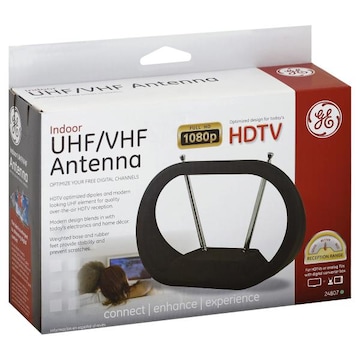
Ge Antenna, UHF/VHF, Indoor
{{ slotProps.actionTitle }}
Product details
Full HD 1080p. Optimized design for today's HDTV. Optimize your free digital channels. HDTV optimized dipoles and modern looking UHF element for quality over-the-air HDTV reception. Modern design blends in with today's electronics and home decor. Weighted base and rubber feet provide stability and prevent scratches. Connect. Enhance. Experience. Reception range - Better. For HDTVs or analog TVs with digital converter box. Package Contents: antenna. The Ideal Counterpart to Streaming Digital Content: Do you stream movies & programming through a PC, game console or other device? Add an HD antenna an get free local TV on your system - eliminate pricey cable and satellite services for good! Be Ready When Severe Weather Strikes: Storms can disrupt access to cable and satellite service. Stay informed with a back-up antenna to provide access to important local broadcasts. This Jasco product comes with a limited-lifetime warranty. Visit www.jascoproducts.com for warranty details and product registration. Questions? Contact us at 1-800-654-8483 between 7:30 am - 5:00 pm CST. Made in China.
Additional info
Easy Installation for Analog TV's with Set Top Box: Connect the coax cable from the antenna directly to the set-top box antenna input. Then connect another coax cable not included from the set-top box output directly to the antenna input on your TV. Run a channel scan on your set-top box, following your set-top box instruction manual. Easy Installation for Today's HDTV's: Connect the coax cable from the antenna directly to the antenna input on your HDTV. Run a channel scan on your television, following your TV's instruction manual. Helpful Tip 1: to ensure you receive the maximum number of channels you may want to experiment re-positioning the antenna and re-scanning for channels. Helpful Tip 2: Place the antenna as high as possible or near a window. Helpful Tip 3: Visit www.antennaweb.org to determine the available television stations and locations of the broadcast towers in your area.



 You are about to leave publix.com and enter the Instacart site that they operate and control. Publix’s delivery and curbside pickup item prices are higher than item prices in physical store locations. Prices are based on data collected in store and are subject to delays and errors. Fees, tips & taxes may apply. Subject to terms & availability. Publix Liquors orders cannot be combined with grocery delivery. Drink Responsibly. Be 21. For prescription delivery, log in to your pharmacy account by using the Publix Pharmacy app or visiting rx.publix.com. Select “Delivery” from the drop-down menu and prepay for your prescriptions. On the confirmation page or within your email receipt, click “Schedule Delivery” to be directed to Instacart’s site.